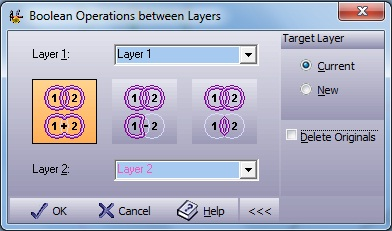
| Layer 1
|
Select first layer to perform Boolean operations
from the list box. |
| Layer 2
|
Select second layer to perform Boolean
operations from the list box. |
|
|
Join the areas defined by two layers together.
The achieved result is a curve resuming the original drawing
attributes. This operation can be performed on a single layer by
selecting layer 1 and
layer 2
fields to be the same layer. |
|
|
Subtract the second layer area from the first
layer area. |
|
|
Get the common area from the two selected
layers. |
|
|
A toggle operation which opens and closes the
Target Layer section |
| Current
|
Copy the entities to the current active layer. |
| New
|
Create a new layer and pass the translated
entities to it. |
| Delete
Originals |
Delete the original entities in the combining
operation. |