| Help Menu | ||
|---|---|---|
 |
Chapter 3. GraphiCAD |  |
| Help Menu | ||
|---|---|---|
| |
Chapter 3. GraphiCAD | |
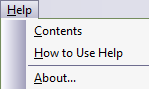
Figure 3.131. Help Menu
 |
Select from the menu, or press the F1 key to open the Help window. You can display the procedure for a particular task, get a definition for a term you do not understand, or see information about any Cimagraphi command, including the Cimagraphi toolbars. |
 |
Select from the menu to obtain assistance about using the help system. From the list of help topics, select the information you wish to view. |
 |
Displays information regarding the application, version and copyright information. If an Internet browser is installed in your computer, press the Web site label to enter GraphiTech Ltd. home page directly. You can get more information regarding the version by using the Windows™ Explorer and right-clicking on the executable file, then viewing the file properties. If you are running in demo mode, the expiration date is displayed on the form. |
Figure 3.132. System Menu

| |
 |
|
| System Menu |  |
Chapter 4. Picture to Part |